A Practical Guide To Implementing An AI Operating System
Jan 29, 2026

Architecture And Shared Memory: Persisting project-level context in a shared memory reduces redundant processing and preserves intent across agents.
Conversational Interfaces And Integrations: A file-aware conversational surface that connects calendars, email, and drives turns natural language into orchestration commands.
Orchestration And Task Management: AI-driven task boards automate triage and sprint planning, keeping execution aligned with conversational decisions.
Building And Extending With Vibe Studio: Prompt-to-code workflows plus Developer Mode and GitHub integration shorten the path from prototype to production UI.
Operational Pattern: Combine memory, chat, task orchestration, and extensible frontends to create an AI OS that minimizes context switching and accelerates delivery.
Introduction
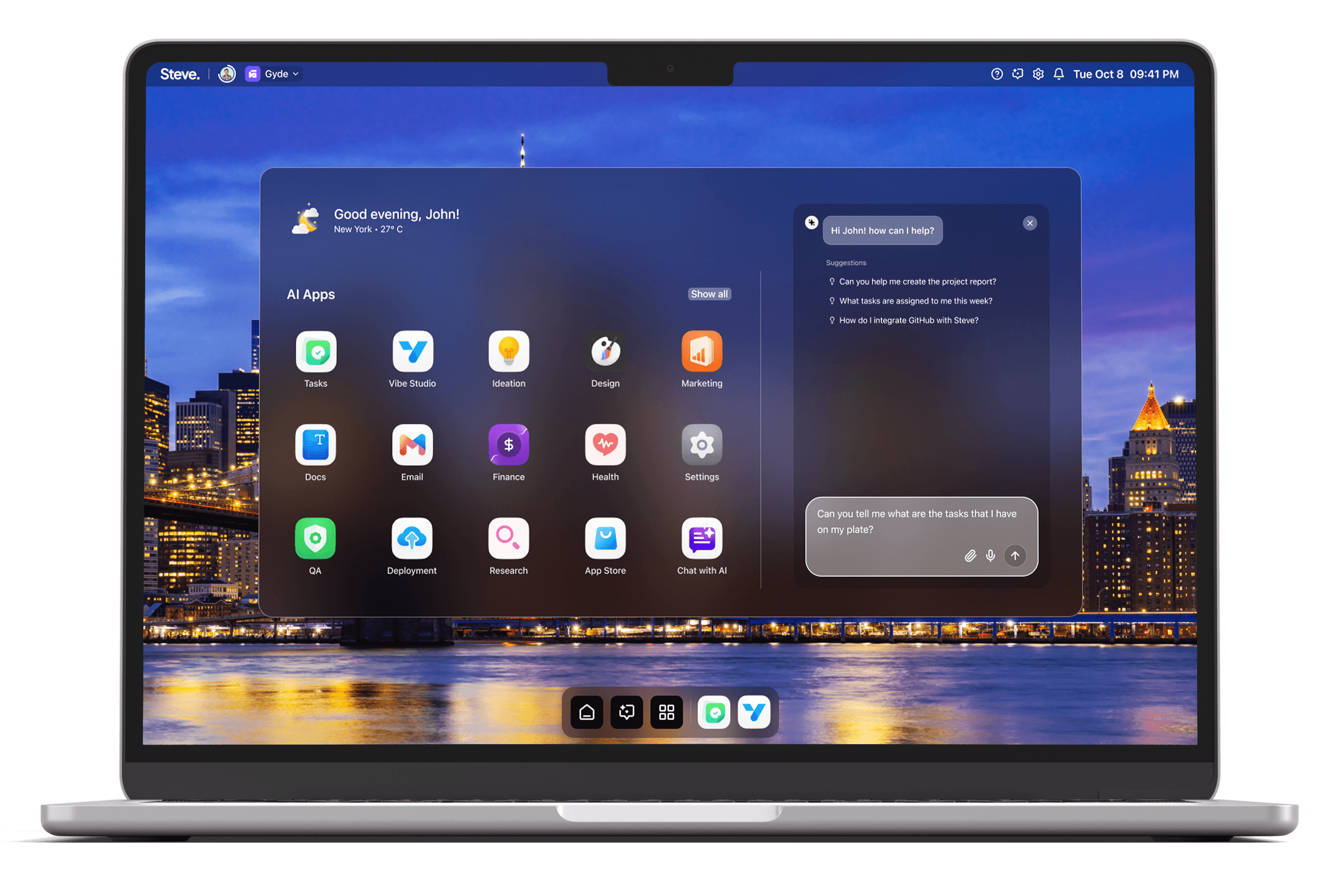
Implementing an AI Operating System requires orchestration across memory, interfaces, integrations, and developer workflows. This practical guide outlines achievable steps and patterns for an enterprise-grade AI OS and shows how Steve acts as an operational ally — providing shared memory for agents, a conversational surface with deep integrations, task orchestration, and app-building tools that accelerate deployment and iteration.
Architecture And Shared Memory
A core design decision for any AI OS is a shared context layer that lets autonomous agents read and write state safely. Steve provides a shared memory system that enables agents to interact, collaborate, and produce contextually relevant outputs. In practice, that memory becomes the single source of truth for session context, user preferences, and cross-agent artifacts (plans, summaries, and flags). Use that layer to reduce redundant re-querying: when one agent summarizes a document or tags an email thread, other agents can consume that result without reprocessing, which shortens latency and preserves intent throughout workflows.
A recommended implementation pattern is separation of transient and persistent memory: keep ephemeral conversation state local to the session while persisting project-level knowledge (decisions, sprint outlines, policy rules) to the shared memory. Steve’s memory model supports that pattern, so agents can escalate relevant context to persistent storage when it drives downstream automation or auditability.
Conversational Interfaces And Integrations
The conversation layer is the user-facing heart of an AI OS. Steve’s conversational interface, powered by advanced AI agents and LLMs, delivers a file-aware chat that connects to calendars, email, drives, and developer tools. Design the user flow so natural language is the orchestration command: users ask for a rollout checklist, and the system composes tasks, locates supporting documents, and schedules meetings through integrated services.
Practical scenario: a product lead asks Steve to prepare a launch plan. Steve pulls related documents from Drive, summarizes key milestones, drafts stakeholder emails, and proposes calendar slots — all within the same conversational thread. That tight coupling between chat, file awareness, and external services reduces context-switching and preserves provenance for decisions.
Orchestration And Task Management
Operationalizing an AI OS requires reliable task orchestration and observability. Steve’s AI-powered task management boards integrate with external issue trackers and can import or create tasks from prompts; they also propose sprints and track execution. Treat the task board as the control plane: connect automated agents to create tasks from email threads, update status after deployments, and surface blockers to product owners.
Concrete practice: convert a discovered bug into a tracked task directly from the chat or email interface. The task management layer should capture acceptance criteria, link to relevant artifacts, and schedule follow-ups. Steve’s integrations with Linear and other tools reduce manual triage and keep execution aligned with conversational intent.
Building And Extending With Vibe Studio
An AI OS must be extensible with admin UIs and custom apps; Vibe Studio offers a prompt-driven pathway to production-ready frontends. Use Vibe Studio to prototype dashboards, control panels, or bespoke integrations by describing required views and behaviors — then refine generated Flutter code in Developer Mode. The embedded secure VS Code editor, GitHub integration, hot reload, and Firebase support let teams iterate quickly and push incremental updates into existing repositories.
A practical approach is to scaffold an operations dashboard that visualizes shared memory artifacts and task states. Generate the initial UI in Vibe Studio, review device-specific previews, and then use Developer Mode to wire in custom widgets or authentication flows. This shortens the loop from concept to deployable UI while preserving traceability between conversational prompts and code.
Steve
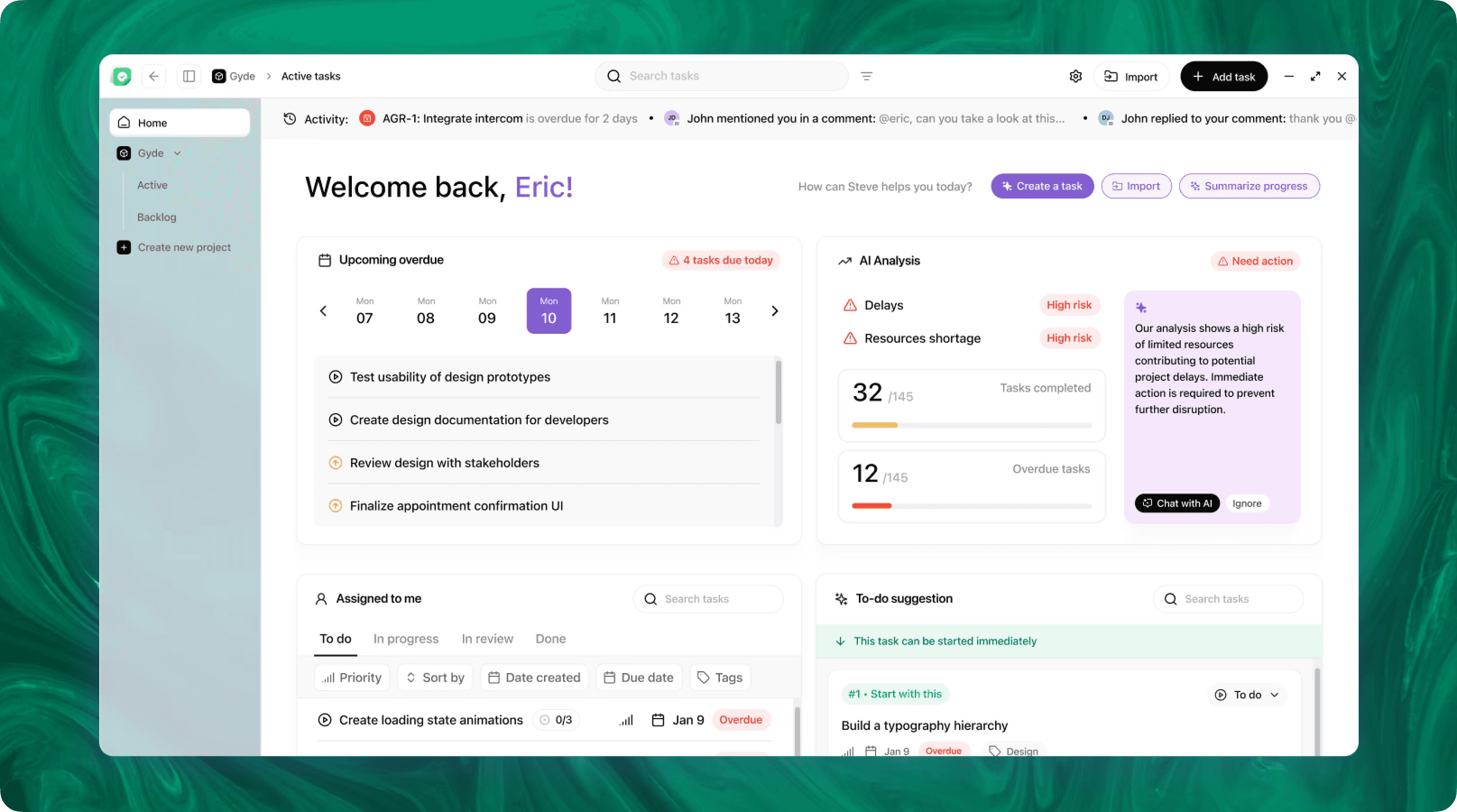
Steve is an AI-native operating system designed to streamline business operations through intelligent automation. Leveraging advanced AI agents, Steve enables users to manage tasks, generate content, and optimize workflows using natural language commands. Its proactive approach anticipates user needs, facilitating seamless collaboration across various domains, including app development, content creation, and social media management.
Conclusion
Implementing an AI Operating System is a matter of composing persistent context, a powerful conversational surface, reliable task orchestration, and an extensible app layer. Steve demonstrates how those components work together: its shared memory enables coherent multi-agent workflows; conversational integrations keep actions and context unified; task boards operationalize decisions; and Vibe Studio accelerates custom UI delivery. Taken together, these capabilities create an AI OS that reduces friction, preserves intent, and speeds iteration across teams.